Password Hashing in Python: bcrypt, Argon2, and Why It Matters
A developer's guide to password security in Python 3: why fast hashes will get you breached, how salts and peppers actually work, choosing between Argon2id and bcrypt, and how to safely migrate legacy databases without breaking logins.
- python
- security
- cryptography
- password
- backend
Password Hashing in Python: bcrypt, Argon2, and Why It Matters#

At the end of the day, every authentication backend stores user credentials in one of two ways: either in plain text or as hashes.
Storing passwords in plain text is sheer negligence. A single SQL injection bug, an exposed backup snapshot, or a rogue APM log instantly hands every user account to attackers on a silver platter.
Because plain text is an obvious non-starter, developers turn to hashes—transforming sensitive secrets into one-way mathematical digests. But here is where the subtler, more dangerous trap lies: assuming any hash is good enough.
Far too many production systems still rely on naive calls like hashlib.sha256(password.encode()).hexdigest(). That 64-character hexadecimal digest looks cryptographic and secure, but a modern gaming GPU can churn through billions of SHA-256 calculations every second. If that database leaks, your users' credentials might as well have been stored in plain text.
Password storage is the only corner of software engineering where slowness is a feature, not a bug. Let’s explore why fast hashes fail, what algorithms you should actually use in Python, and how to safely modernize your auth system without logging out a single user.
⚡ The 30-Second Summary
- Never use fast hashes (MD5, SHA-1, SHA-256, SHA-512) for credentials.
- Building something new? Use Argon2id via
argon2-cffi. It's the modern gold standard.- Inherited bcrypt? Keep it, but ensure your cost factor is set to 12 or higher.
- Working under FIPS compliance? Use PBKDF2-HMAC-SHA256 with at least 600,000 iterations.
- Salts are mandatory and automatic in modern libraries. Don't build custom salt logic.
- Always use constant-time comparisons to prevent timing attacks.
Why "Fast" Hashes Will Get You Breached#
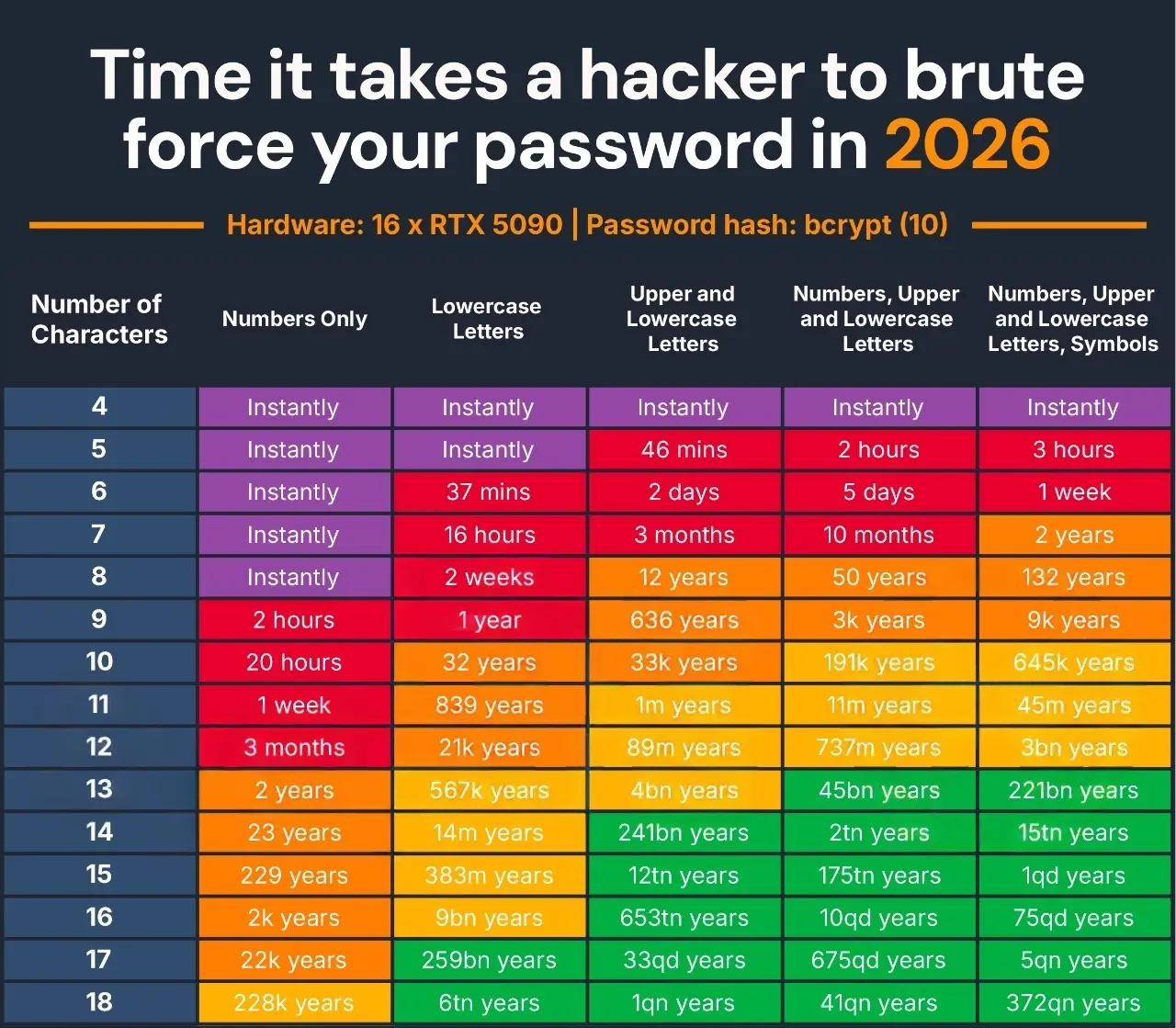
When computer scientists designed SHA-256, they had a specific goal: verify multi-gigabyte ISO images and sign TLS certificates as fast as possible.
A single enthusiast graphics card—like an NVIDIA RTX 4090—can compute over 8 billion SHA-256 hashes per second. Rent a cluster of eight cards on AWS for an afternoon, and an attacker can try tens of billions of candidate passwords every single second.
Attacker's GPU (SHA-256):  ████████████████████ 8,500,000,000 attempts / sec
Attacker's GPU (Argon2id): █ 1,200 attempts / sec
For password storage, your goal is deliberate friction. You want an algorithm that takes around 250 to 500 milliseconds on your production hardware.
To a real user logging in, a 300 ms delay feels instant. But to a hacker with a leaked database, computing 300 ms per guess turns an afternoon dictionary attack into a centuries-long financial nightmare.
Hashing vs. Encryption: The Confusion That Needs to Die#
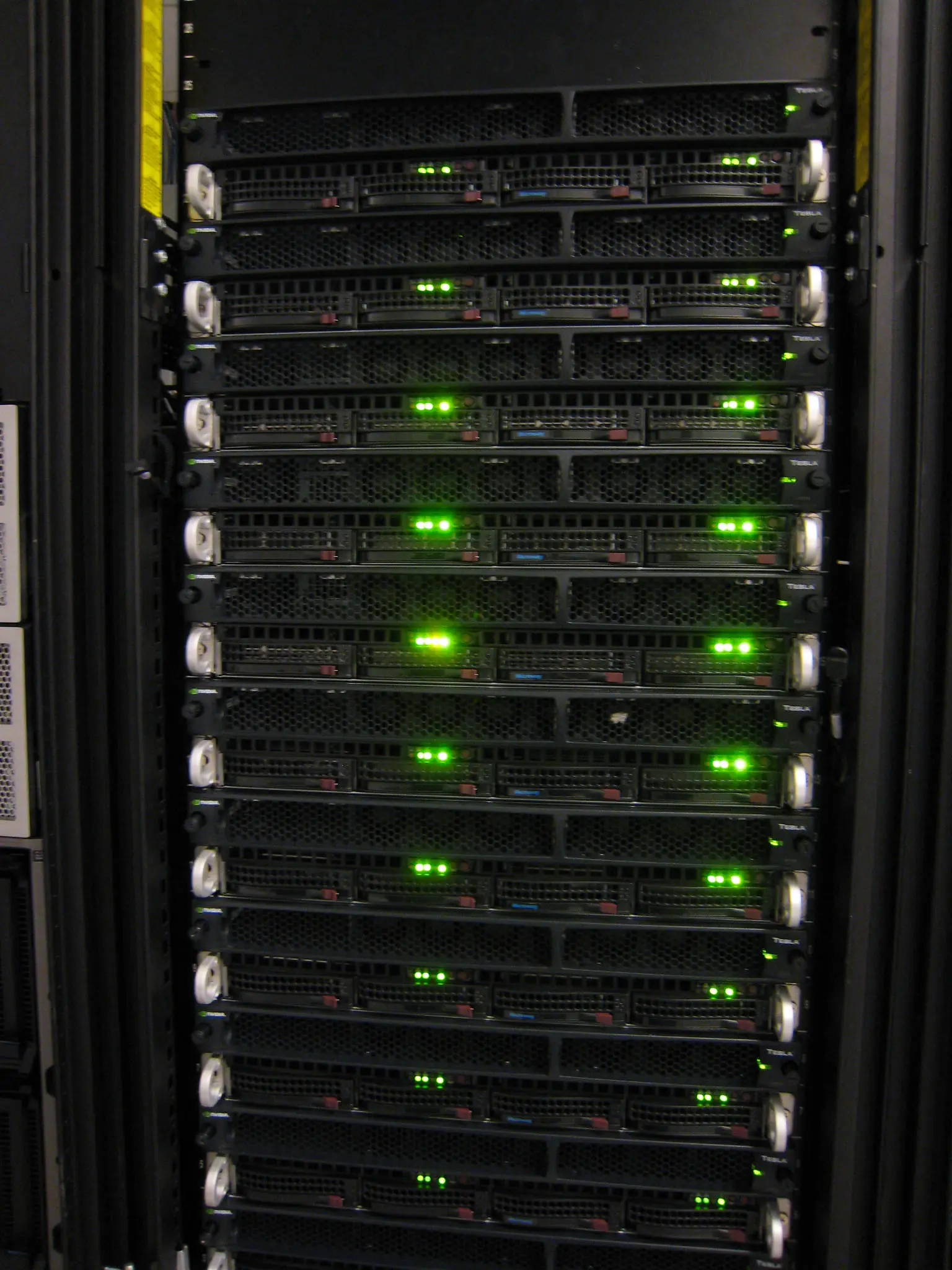
A common mistake seen in marketing copy and junior code reviews alike: "Don't worry, we encrypt all passwords."
Treat that phrase as an immediate warning sign:
| Primitive | Is it reversible? | Purpose | What happens if a leak occurs? |
|---|---|---|---|
| Encryption (AES, RSA) | Yes (via a secret key) | Protecting data in transit or rest so authorized parties can read it later. | If attackers compromise the key or KMS, they own every password in plaintext. |
| Hashing (Argon2, bcrypt) | No (one-way mathematical trapdoor) | Verifying identity without ever knowing the underlying secret. | Attackers must guess each password individually through brute force. |
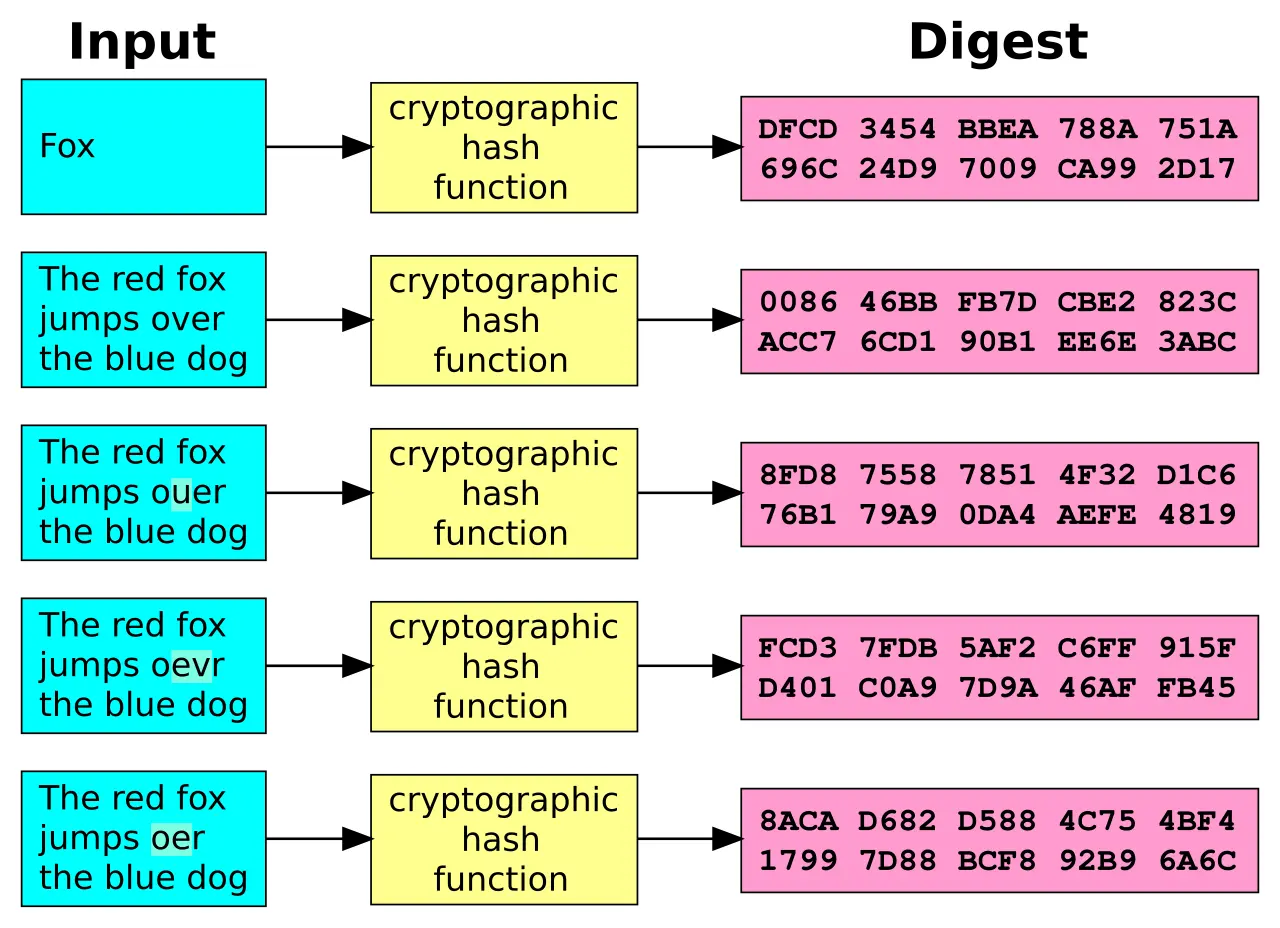
When a user logs in, you never "decrypt" their password. You apply the exact same mathematical formula to their candidate input and check if the resulting digests match.
The Sidekicks: Salts and Peppers Explained Simply#
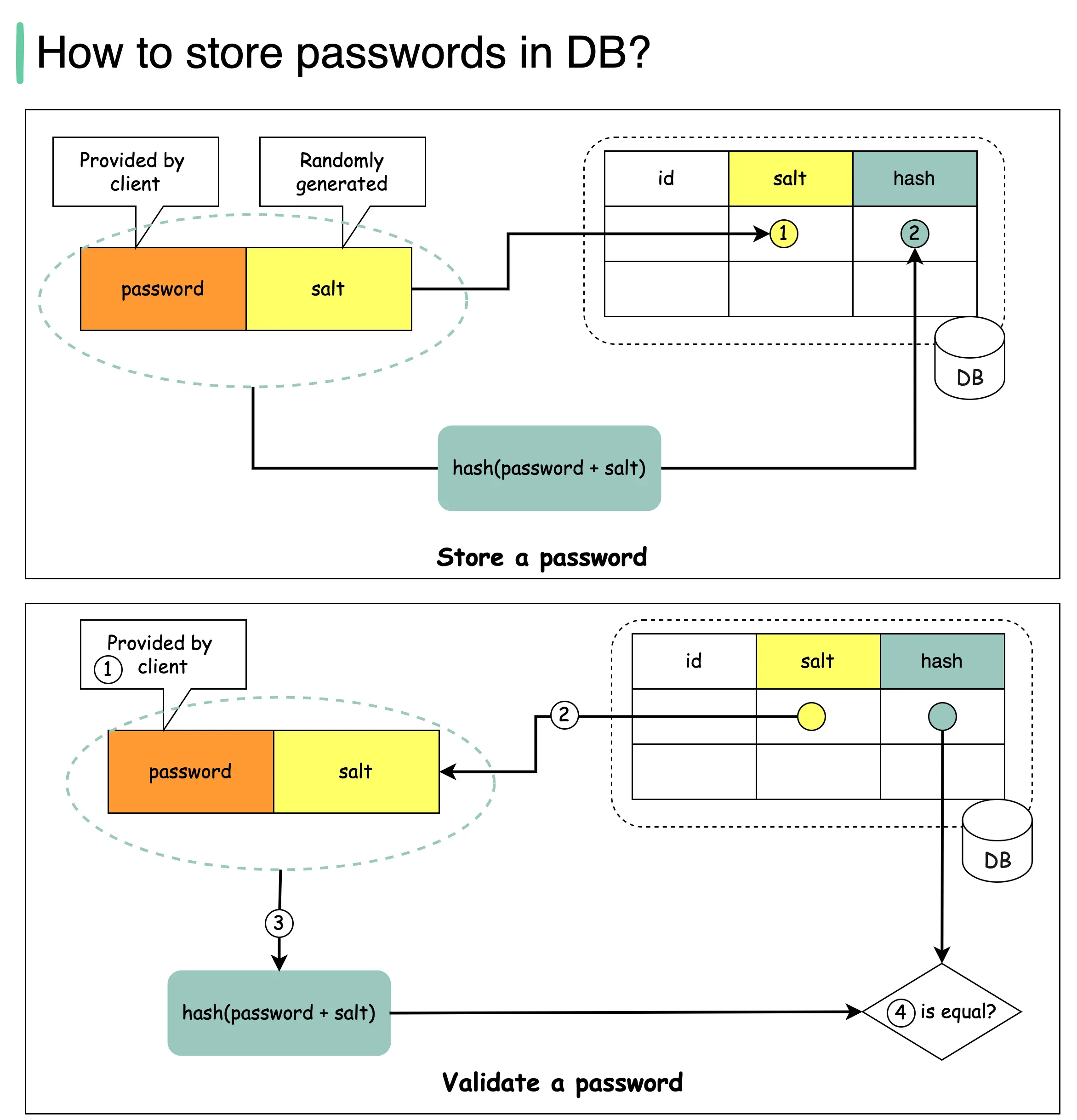
1. The Salt: Killing the "Rainbow Table"#
If ten users choose "P@ssword123!", a naive hash produces ten identical strings in the database. Attackers don't even need to crack them one by one; they just precompute hashes for millions of popular passwords (a rainbow table) and run an instant lookup match.
A salt is just a cryptographically secure random string appended to the password before hashing:
$digest = Hash(password + salt)$
- Unique per user: Alice and Bob can share the same terrible password, but because their salts are different, their stored hashes look completely unrelated.
- Not a secret: The salt lives in plaintext right alongside the hash in your database.
- Automatic: Modern libraries generate, format, and parse salts for you. You do not need a
saltcolumn in your SQL schema.
2. The Pepper: The Extra Safe Behind the Counter#
If an attacker dumps your SQL database through an injection flaw, they get both the hashes and their salts. Offline cracking can now begin.
A pepper is an application-wide secret key mixed into the hash, stored outside the database (such as in AWS Secrets Manager, Vault, or environment variables).
[ User Input ] + [ Salt (from DB) ] + [ Pepper (from Env/Vault) ] ──▶ [ Hash ]If your database leaks without your application server secrets, the hashes are practically uncrackable because the attacker is missing an entire component of the formula.
💡 Practical Advice: Only implement a pepper if your team has mature key management. If you lose your pepper, every single user is permanently locked out. A properly tuned Argon2id hash with a strong salt already offers world-class protection for most applications.
The Contenders: Choosing Your Algorithm#
Are you building a brand new application?
 ├── YES ──▶ Use Argon2id (pip install argon2-cffi)
 └── NO
      ├── Already using bcrypt? ──▶ Keep it, but raise work factor to 12+
      └── Strict government/FIPS requirement? ──▶ PBKDF2-HMAC-SHA256 (600,000+ rounds)
1. Argon2id: The Undisputed King#
Argon2 won the rigorous multi-year Password Hashing Competition in 2015 and is standardized under RFC 9106.
Its superpower is memory hardness. GPUs are fast because they have thousands of tiny cores running simple math in parallel. Argon2id forces the hardware to allocate a substantial chunk of RAM (e.g., 64 MiB) for each hashing thread. A high-end GPU with 24 GB of VRAM suddenly runs out of room after only a few hundred concurrent threads, neutralizing the attacker's hardware advantage.
pip install argon2-cffifrom argon2 import PasswordHasher
from argon2.exceptions import VerifyMismatchError, VerificationError, InvalidHashError
# Configure production-grade cost parameters
ph = PasswordHasher(
time_cost=3, # 3 iterations
memory_cost=65536, # 64 MiB of RAM usage
parallelism=4, # 4 parallel CPU threads
hash_len=32,
salt_len=16,
)
raw_password = "correct horse battery staple"
# 1. Hashing: Salt generation and parameter encoding happen automatically
hashed = ph.hash(raw_password)
print(hashed)
# Output looks like:
# $argon2id$v=19$m=65536,t=3,p=4$q7tW4j...$O1WkZ9...
# [algorithm] [version] [memory, time, threads] [salt] [hash]
# 2. Verification
try:
ph.verify(hashed, raw_password)
print("✅ Access granted.")
except VerifyMismatchError:
print("❌ Invalid password.")
except (VerificationError, InvalidHashError):
print("⚠️ Malformed hash record.")
# 3. Transparent Parameter Upgrades
# If your server upgrades in 2 years and you increase memory_cost,
# this method checks if an existing hash needs a silent recalculation.
if ph.check_needs_rehash(hashed):
new_hash = ph.hash(raw_password)
# db.save_password_hash(user_id, new_hash)🐳 Production Gotcha: Docker & Kubernetes OOM Kills
If your service runs in a container with a strict memory limit (e.g., 512 MiB) and uses a memory_cost of 64 MiB (65,536 KiB), ten concurrent login requests will demand over 640 MiB of RAM in an instant. The Linux kernel will invoke the OOM Killer and crash your app container.
If you are memory-constrained:
- Rate-limit or queue login attempts at the reverse proxy (Nginx, Traefik).
- Or tune
memory_costto 19–32 MiB and slightly increasetime_costto maintain overall work duration.
2. bcrypt: The Reliable Battleaxe#
Released in 1999, bcrypt has protected production workloads for over a quarter of a century without any critical theoretical breaks.
bcrypt uses a logarithmic cost factor. Increasing the cost by +1 doubles the execution time:
- Cost
10= 210 = 1,024 iterations - Cost
12= 212 = 4,096 iterations (recommended baseline) - Cost
14= 214 = 16,384 iterations
pip install bcryptimport bcrypt
password = b"my-super-secure-passphrase"
# Hash: rounds=12 takes roughly 250-350ms on modern CPUs
salt = bcrypt.gensalt(rounds=12)
hashed = bcrypt.hashpw(password, salt)
print(hashed) # b'$2b$12$e8y...U5j.'
# Verify: bcrypt.checkpw handles timing-safe verification under the hood
if bcrypt.checkpw(password, hashed):
print("✅ Authenticated!")
else:
print("❌ Bad credentials.")⚠️ The 72-Byte Trap (And How to Handle Long Passphrases)
bcrypt has a hard architectural limit inherited from the Blowfish cipher: it silently ignores everything after byte 72. In standard bcrypt, "a" * 72 + "secret1" and "a" * 72 + "secret2" produce identical hashes. (Note: recent versions of Python's bcrypt raise a ValueError instead of silently truncating).
If your users generate 100-character passphrases, pre-hash them with SHA-256 and Base64-encode the result before sending them to bcrypt:
import base64
import hashlib
import bcrypt

def hash_long_password(password_bytes: bytes) -> bytes:
    # 1. Compress infinite length down to safe fixed 32 bytes
    digest = hashlib.sha256(password_bytes).digest()
    # 2. Base64 encode to remove null bytes (which terminate C strings)
    safe_token = base64.b64encode(digest)
    # 3. Hash safely with bcrypt (always <= 44 chars)
    return bcrypt.hashpw(safe_token, bcrypt.gensalt(rounds=12))
3. PBKDF2: The Compliance Checkbox#
PBKDF2 isn't memory-hard, making it significantly easier to crack on custom ASIC/GPU rigs than Argon2 or bcrypt. However, it holds one distinct trump card: FIPS-140 certification.
If you work in US federal contracting, defense, or certain banking sectors, compliance mandates will often reject Argon2 and require PBKDF2.
Python provides PBKDF2 out of the box in the standard library:
import hashlib
import hmac
import os
import secrets

password = "enterprise-compliant-password".encode()
salt = secrets.token_bytes(16)

# OWASP currently recommends >= 600,000 iterations for HMAC-SHA256
iterations = 600_000

key = hashlib.pbkdf2_hmac(
    hash_name="sha256",
    password=password,
    salt=salt,
    iterations=iterations,
    dklen=32,
)

# Verification MUST use hmac.compare_digest to prevent timing attacks!
candidate_input = "enterprise-compliant-password".encode()
test_key = hashlib.pbkdf2_hmac("sha256", candidate_input, salt, iterations, dklen=32)

if hmac.compare_digest(key, test_key):
    print("✅ Match")
Pitfalls That Will Haunt Your Production System#
1. Naive String Comparisons (==)#
# ❌ DANGEROUS: Short-circuits on the first mismatched byte!
# Attackers measure response times in microseconds to reconstruct the hash.
if submitted_hash == stored_hash:
    ...

# ✅ SAFE: Constant-time comparison
import hmac
if hmac.compare_digest(submitted_hash, stored_hash):
    ...
2. Logging the Request Body on Failed Logins#
When a customer mistypes their username by entering their password into the username field, debug loggers configured to log the raw payload will write cleartext passwords directly to Datadog, CloudWatch, or Splunk. Sanitize auth payloads before logging.
3. Inventing Homebrew Salt Schemes#
You do not need to write salt = str(uuid4()) and create a custom SQL column. Formats like $argon2id$v=19$... and $2b$12$... are standardized Modular Crypt Format (MCF) strings containing the salt, parameters, and digest. Store that single string in one column.
Zero-Downtime Migration: Upgrading Legacy Hashes#
What if you just inherited an old Django or Flask application storing un-salted MD5 or SHA-256 hashes?
You can't decode the old passwords—that's the point of a hash. But you can perform lazy re-hashing: upgrade each user's hash silently in the background at the exact moment they log in.
import hashlib
import hmac
from argon2 import PasswordHasher
from argon2.exceptions import VerifyMismatchError, VerificationError, InvalidHashError

ph = PasswordHasher(time_cost=3, memory_cost=65536, parallelism=4)

def check_password_and_upgrade(stored_record: str, submitted_pw: str) -> tuple[bool, str | None]:
    """
    Verifies the user's password.
    Returns: (is_authenticated, new_hash_to_persist_or_None)
    """
    pw_bytes = submitted_pw.encode("utf-8")

    # Scenario A: Modern Argon2id
    if stored_record.startswith("$argon2id$"):
        try:
            ph.verify(stored_record, submitted_pw)
        except (VerifyMismatchError, VerificationError, InvalidHashError):
            return False, None

        # Check if hash was created with older, weaker cost parameters
        rehashed = ph.hash(submitted_pw) if ph.check_needs_rehash(stored_record) else None
        return True, rehashed

    # Scenario B: Legacy SHA-256 (format: "sha256:<salt_hex>:<hash_hex>")
    if stored_record.startswith("sha256:"):
        _, salt_hex, digest_hex = stored_record.split(":")
        salt = bytes.fromhex(salt_hex)
        expected = bytes.fromhex(digest_hex)

        candidate = hashlib.sha256(salt + pw_bytes).digest()
        if not hmac.compare_digest(candidate, expected):
            return False, None

        # Success! Upgrade them transparently to Argon2id
        print("🔄 Upgrading legacy user to Argon2id...")
        return True, ph.hash(submitted_pw)

    # Unknown hash format
    return False, None
# The Secure Login Route
def handle_login(username: str, candidate_pw: str) -> bool:
user = db.find_user(username)
if not user:
# MITIGATION: Prevent User Enumeration via Timing Attacks
# If the user doesn't exist, compute a dummy hash anyway so the response
# time matches a legitimate user authentication attempt (~300ms).
ph.hash(candidate_pw)
return False
is_valid, new_hash = check_password_and_upgrade(user.password_hash, candidate_pw)
if is_valid:
if new_hash:
db.update_user_hash(user.id, new_hash)
return True
return FalseTest It Yourself: Interactive Hash Playground#
Want to experiment with these algorithms without writing boilerplate code? Try the In-Browser Password Hash Playground.
Everything runs 100% locally in your browser via WebAssembly (no passwords or credentials are ever sent across the wire). You can:
- Generate and inspect raw Argon2id vs. bcrypt strings.
- Tweak memory costs and iteration counts to see how they impact runtime.
- Verify hash formats against your Python backend outputs.
Authentication isn't about outsmarting mathematically complex problems on your own; it's about picking boring, established standards and letting battle-tested libraries do the heavy lifting. Pick Argon2id, configure realistic resource limits, and your users' passwords will remain safe even if your database ends up in the wrong hands.